Ramus

Let your ideas branch out.

Ramus is a mind map and outline app for Mac, iPad and iPhone. Start for free, and buy Pro once to keep it.

Coming soon to the App Store

Lass deine Ideen Zweige treiben.

Ramus ist eine App für Mindmaps und Gliederungen auf Mac, iPad und iPhone. Du startest kostenlos, und Pro kaufst du einmal und behältst es.

Bald im App Store

アイデアを、枝のように広げよう。

Ramus は Mac、iPad、iPhone のためのマインドマップとアウトラインのアプリです。無料で始められ、Pro は一度買えばずっと使えます。

App Store で近日公開

생각이 가지를 뻗도록.

Ramus는 Mac, iPad, iPhone을 위한 마인드맵·아웃라인 앱이에요. 무료로 시작하고, Pro는 한 번 사면 계속 내 것이에요.

App Store 출시 예정

Ramus
  • One purchase, yours to keepEinmal kaufen, für immer behalten一度買えば、ずっと自分のもの한 번 사면 내 것
  • No account and no serverKein Konto, kein Serverアカウントもサーバーも不要계정도 서버도 없이
  • Plain files you can take anywhereNormale Dateien, die du überallhin mitnimmstどこへでも持ち出せるふつうのファイル어디로든 옮길 수 있는 평범한 파일
  • Map and outline, side by sideMap und Gliederung nebeneinanderマップとアウトラインを並べて맵과 아웃라인을 나란히

The same map on every deviceDieselbe Map auf jedem Gerätどのデバイスでも同じマップ어느 기기에서나 같은 맵

Your maps sync through your own iCloud Drive, and Pro unlocks on all three with one Apple ID.Deine Maps synchronisieren über dein eigenes iCloud Drive, und Pro gilt mit einer Apple-ID auf allen drei Geräten.マップはあなた自身の iCloud Drive で同期され、Pro は同じ Apple ID なら3つのデバイスすべてで使えます。맵은 내 iCloud Drive로 동기화되고, Pro는 같은 Apple ID라면 세 기기 모두에서 열려요.

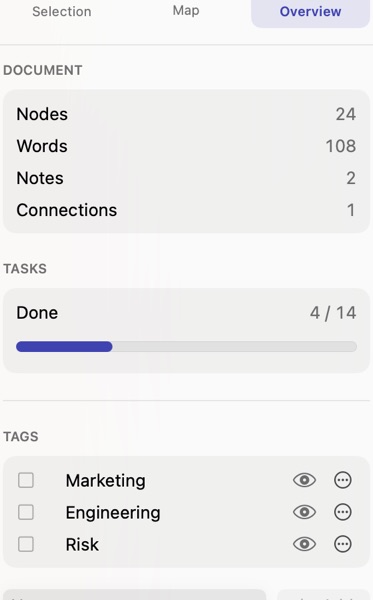
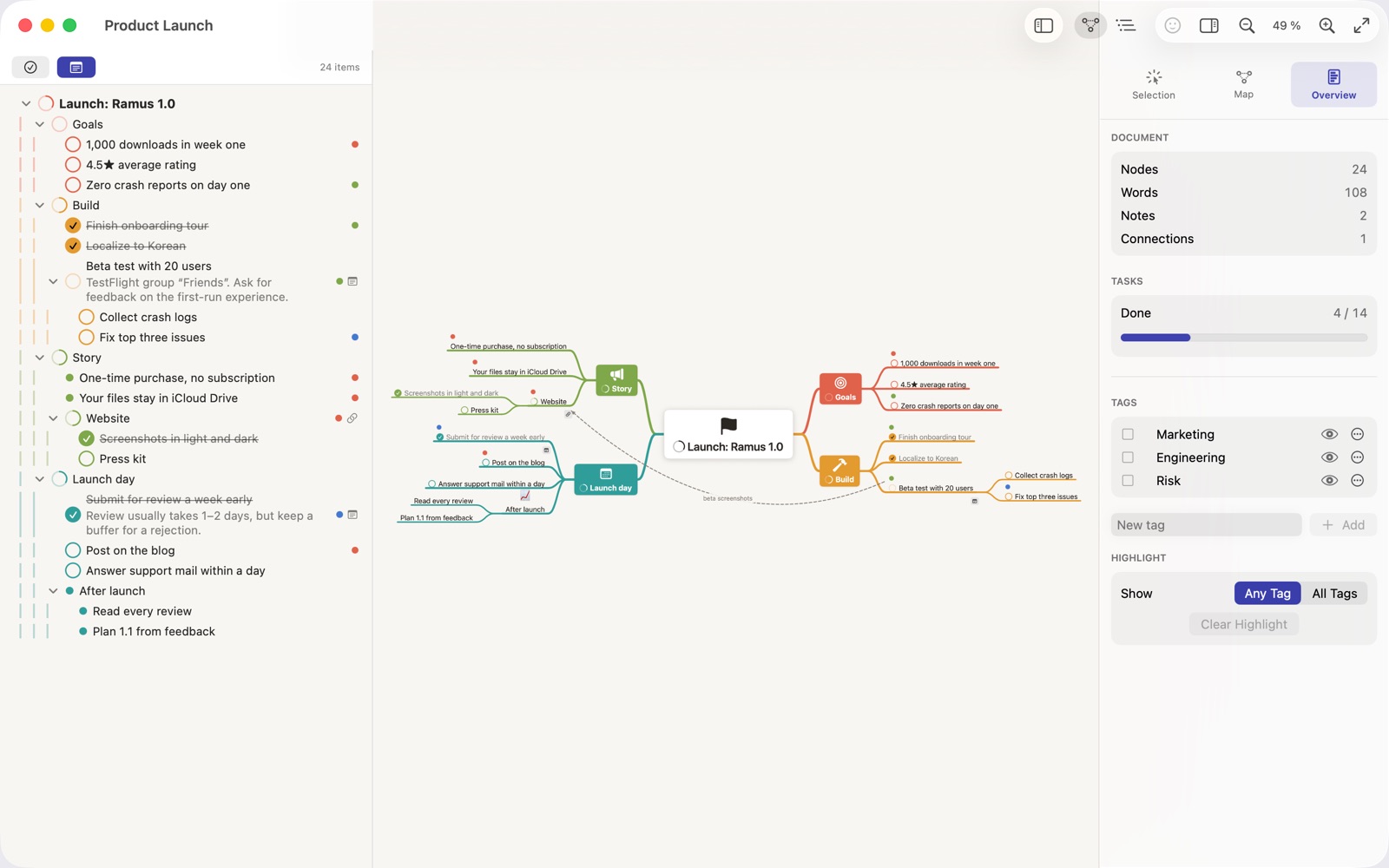
Ramus on Mac: the outline beside a product launch map, with the Overview inspector
On MacThe outline sits beside the map, and the inspector shows the whole document at a glance.Auf dem MacDie Gliederung steht neben der Map, und der Inspektor zeigt dir das ganze Dokument auf einen Blick.Mac でマップの横にアウトラインが並び、インスペクタで書類全体をひと目で確認できます。Mac에서맵 옆에 아웃라인이 함께 있고, 인스펙터에서 문서 전체를 한눈에 봐요.
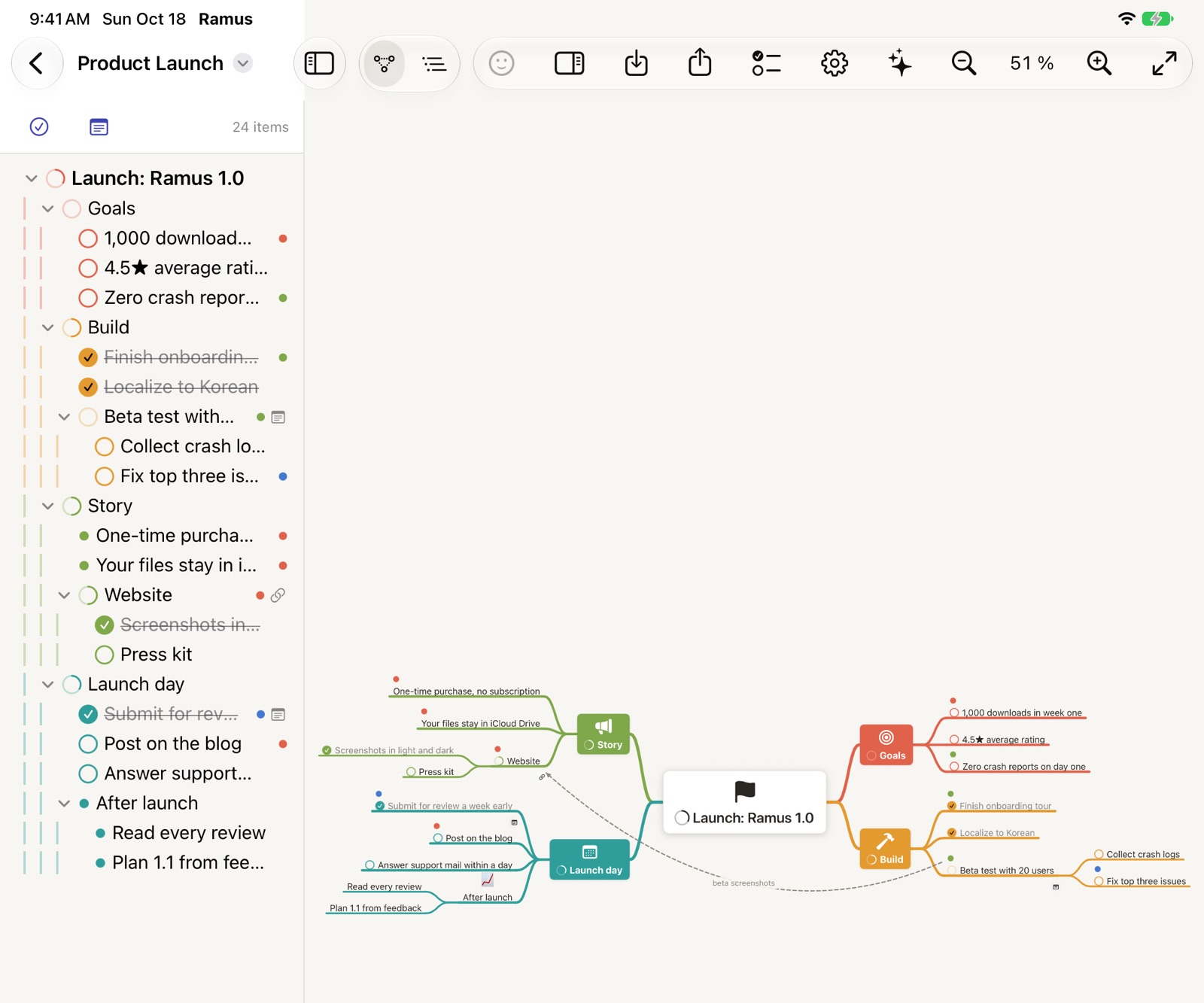
Ramus on iPad with the outline sidebar next to the map
On iPadTap to edit, drag to rearrange, pinch to zoom. The outline stays beside the map here too.Auf dem iPadTippen zum Bearbeiten, Ziehen zum Umordnen, zwei Finger zum Zoomen. Auch hier steht die Gliederung neben der Map.iPad でタップで編集、ドラッグで並べ替え、ピンチで拡大。ここでもアウトラインがマップの横に並びます。iPad에서눌러서 편집하고, 끌어서 옮기고, 두 손가락으로 확대해요. 여기서도 아웃라인이 맵 옆에 있어요.
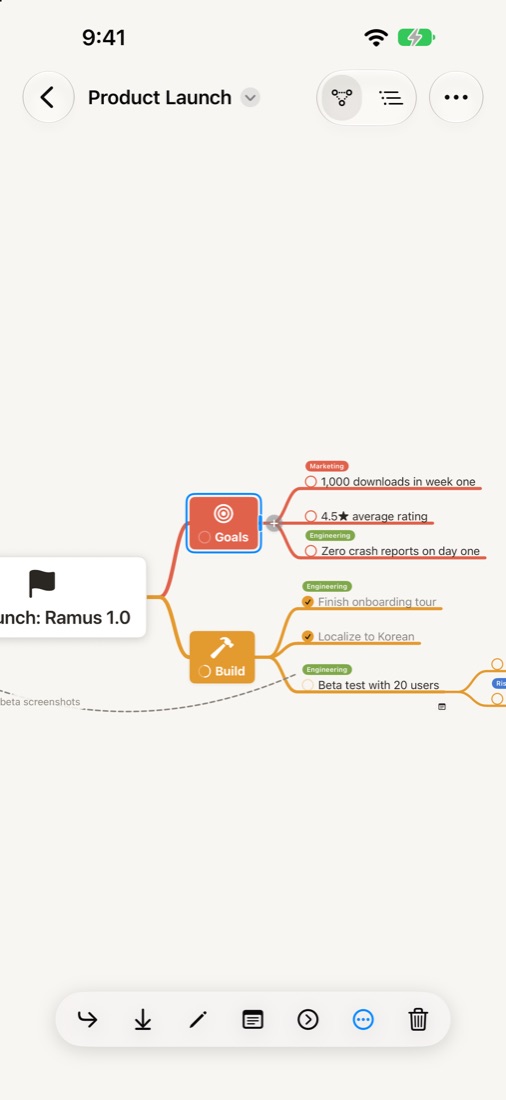
Ramus on iPhone with a branch selected and the action bar
On iPhoneThe action bar keeps every command within reach of your thumb.Auf dem iPhoneDie Aktionsleiste hält jeden Befehl in Reichweite deines Daumens.iPhone でアクションバーで、すべての操作が親指の届くところにあります。iPhone에서액션 바 덕분에 모든 명령이 엄지 가까이에 있어요.

Made for thinking things throughGemacht, um Dinge zu durchdenken考えを最後まで整理するために생각을 끝까지 정리하도록

Map and outline in one

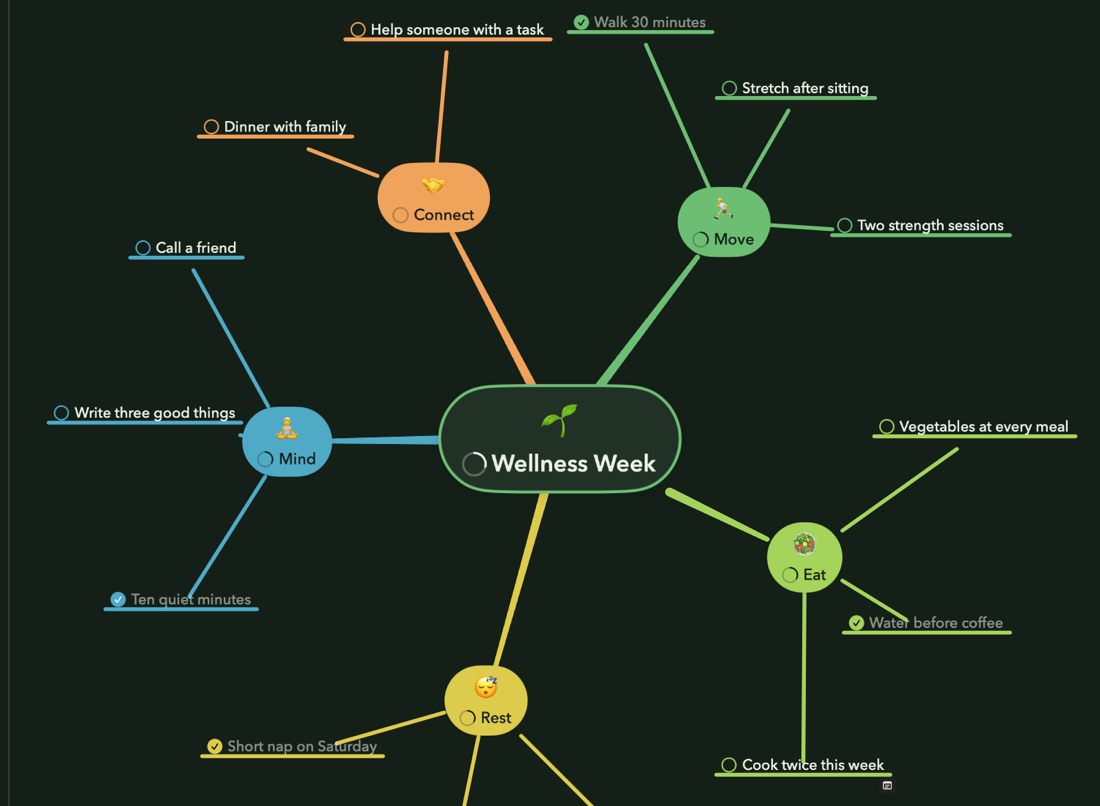
Every map is also an outline. Write in either view and the other follows, with tags, notes and tasks in both.

Map und Gliederung in einem

Jede Map ist auch eine Gliederung. Schreib in einer Ansicht, die andere zieht mit, samt Tags, Notizen und Aufgaben.

マップでもあり、アウトラインでもある

どのマップもアウトラインとして表示できます。どちらで書いても、タグやメモ、タスクごともう一方に反映されます。

맵이자 아웃라인

모든 맵은 아웃라인이기도 해요. 어느 쪽에서 써도 태그, 노트, 작업까지 다른 쪽이 따라와요.
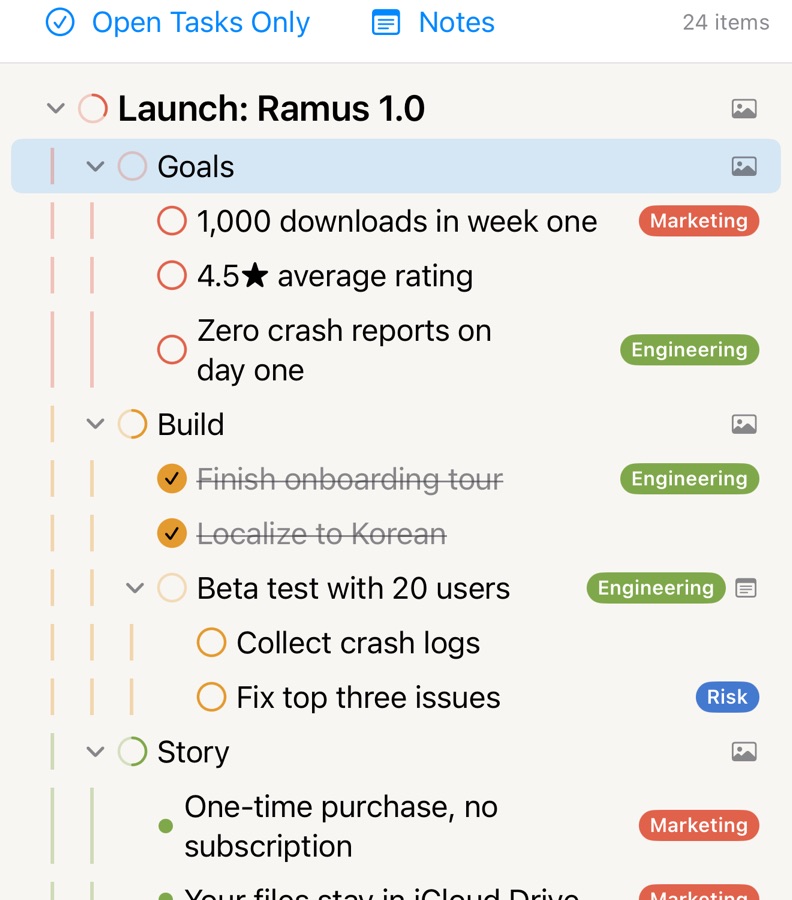
Tasks that show progress

Turn any idea into a task. Each branch shows how much is done, and Reminders stays in step.

Aufgaben mit Fortschritt

Mach aus jeder Idee eine Aufgabe. Jeder Zweig zeigt, wie viel erledigt ist, und Erinnerungen bleibt auf dem gleichen Stand.

進捗が見えるタスク

どのアイデアもタスクにできます。枝ごとに進み具合が見え、リマインダーとも連携します。

진행률이 보이는 작업

어떤 아이디어든 작업으로 바꿀 수 있어요. 가지마다 얼마나 끝났는지 보이고, 미리 알림과도 맞춰져요.

Themes for light and dark

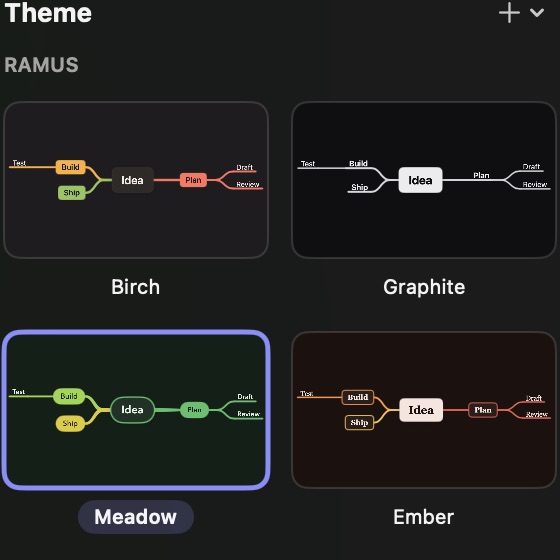
Twelve themes that follow your appearance setting, or one you make yourself.

Themen für hell und dunkel

Zwölf Themen, die deinem Erscheinungsbild folgen, oder eins, das du selbst gestaltest.

ライトとダークに合わせたテーマ

外観の設定に合わせて変わるテーマ12種類。自分で作ることもできます。

라이트와 다크에 맞춘 테마

화면 모드를 따라 바뀌는 테마 12개, 직접 만들 수도 있어요.

Yours, and only yours

No account, no analytics, no server. Maps live on your devices and in your own iCloud Drive, and everything works offline.

Ganz und gar deins

Kein Konto, keine Analyse, kein Server. Deine Maps liegen auf deinen Geräten und in deinem eigenen iCloud Drive, und alles funktioniert offline.

すべて、あなただけのもの

アカウントも分析ツールもサーバーもありません。マップはあなたのデバイスとあなた自身の iCloud Drive にだけ保存され、オフラインでもすべての機能が使えます。

온전히 내 것

계정도, 분석 도구도, 서버도 없어요. 맵은 내 기기와 내 iCloud Drive에만 있고, 인터넷 없이도 모든 기능이 동작해요.

Fits how you work

Import OPML, Markdown, FreeMind and plain text. Export Markdown, OPML, FreeMind, TextBundle, PDF, PNG and SVG. Shortcuts, widgets, Spotlight and Quick Look included.

Passt zu deiner Arbeitsweise

Importiere OPML, Markdown, FreeMind und reinen Text. Exportiere als Markdown, OPML, FreeMind, TextBundle, PDF, PNG und SVG. Mit Kurzbefehlen, Widgets, Spotlight und Übersicht.

いつもの作業にそのまま

OPML、Markdown、FreeMind、テキストを読み込み、Markdown、OPML、FreeMind、TextBundle、PDF、PNG、SVG に書き出せます。ショートカット、ウィジェット、Spotlight、クイックルックにも対応。

내 작업 방식 그대로

OPML, Markdown, FreeMind, 텍스트를 가져오고, Markdown, OPML, FreeMind, TextBundle, PDF, PNG, SVG로 내보내요. 단축어, 위젯, Spotlight, 훑어보기도 지원해요.

Start free. Buy Pro once.Kostenlos starten. Pro einmal kaufen.無料で始めて、Pro は一度だけ。무료로 시작하고, Pro는 한 번만.

Free

$0

  • Unlimited documents
  • Two themes and the basic shapes
  • Outline view
  • Export to PNG, PDF, Markdown, OPML and more

Kostenlos

0 $

  • Unbegrenzt viele Dokumente
  • Zwei Themen und die Grundformen
  • Gliederung ansehen
  • Export als PNG, PDF, Markdown, OPML und mehr

無料

$0

  • 書類の数は無制限
  • テーマ2種類と基本の形
  • アウトラインの表示
  • PNG、PDF、Markdown、OPML などへの書き出し

무료

$0

  • 문서 수 무제한
  • 테마 2개와 기본 모양
  • 아웃라인 보기
  • PNG, PDF, Markdown, OPML 등으로 내보내기

Ramus Pro

$29.99one-time

  • Every theme, shape and color, plus your own themes
  • Notes, tasks, tags, links and connections
  • Focus mode, layout options and outline editing
  • SVG export and print options
  • Mac, iPad and iPhone with one Apple ID, shared with your family

Ramus Pro

29,99 $einmalig

  • Alle Themen, Formen und Farben, dazu eigene Themen
  • Notizen, Aufgaben, Tags, Links und Verbindungen
  • Fokusmodus, Layoutoptionen und Gliederung bearbeiten
  • SVG-Export und Druckoptionen
  • Mac, iPad und iPhone mit einer Apple-ID, mit Familienfreigabe

Ramus Pro

$29.99買い切り

  • すべてのテーマ・形・色と自作テーマ
  • メモ、タスク、タグ、リンク、関連線
  • フォーカスモード、レイアウトオプション、アウトラインの編集
  • SVG 書き出しと印刷オプション
  • 同じ Apple ID の Mac、iPad、iPhone で。ファミリー共有にも対応

Ramus Pro

$29.991회 구매

  • 모든 테마, 모양, 색과 나만의 테마
  • 노트, 작업, 태그, 링크, 연결선
  • 포커스 모드, 레이아웃 옵션, 아웃라인 편집
  • SVG 내보내기와 인쇄 옵션
  • 같은 Apple ID의 Mac, iPad, iPhone에서, 가족과 함께

Price in the United States; the App Store sets the price in your country. Requires macOS 15, iOS 18 or iPadOS 18 or later. Available in English, German, Japanese and Korean.Preis in den USA; den Preis in deinem Land legt der App Store fest. Ab macOS 15, iOS 18 und iPadOS 18. Auf Deutsch, Englisch, Japanisch und Koreanisch.米国での価格です。各国の価格は App Store が決めます。macOS 15、iOS 18、iPadOS 18 以降に対応。表示言語は日本語・英語・ドイツ語・韓国語です。미국 가격 기준이에요. 다른 나라의 가격은 App Store가 정해요. macOS 15, iOS 18, iPadOS 18 이상에서 동작하고, 한국어, 영어, 일본어, 독일어를 지원해요.

Compare Free and Pro in detailKostenlos und Pro im Detail vergleichen無料版と Pro を詳しく比べる무료와 Pro 자세히 비교하기
FreePro
DocumentsUnlimitedUnlimited
Themes2All, plus your own
Node shapes and colorsBasic setAll
Stickers12All, plus emoji and photos
Tags1Unlimited
Notes, tasks, links, connections—✓
Focus mode, layout options—✓
OutlineViewView and edit
ExportPNG, PDF, Markdown, OPML, FreeMind, TextBundleAdds SVG and print options
KostenlosPro
DokumenteUnbegrenztUnbegrenzt
Themen2Alle und eigene
Knotenformen und FarbenGrundauswahlAlle
Sticker12Alle, dazu Emoji und Fotos
Tags1Unbegrenzt
Notizen, Aufgaben, Links, Verbindungen—✓
Fokusmodus, Layoutoptionen—✓
GliederungAnsehenAnsehen und bearbeiten
ExportPNG, PDF, Markdown, OPML, FreeMind, TextBundleDazu SVG und Druckoptionen
無料Pro
書類の数無制限無制限
テーマ2種類すべて+自作
ノードの形と色基本セットすべて
ステッカー12種類すべて+絵文字、写真
タグ1つ無制限
メモ、タスク、リンク、関連線—✓
フォーカスモード、レイアウトオプション—✓
アウトライン表示表示と編集
書き出しPNG、PDF、Markdown、OPML、FreeMind、TextBundleSVG と印刷オプションを追加
무료Pro
문서 수무제한무제한
테마2개전체 + 직접 만들기
노드 모양과 색기본 세트전체
스티커12개전체 + 이모지, 사진
태그1개무제한
노트, 작업, 링크, 연결선—✓
포커스 모드, 레이아웃 옵션—✓
아웃라인보기보기와 편집
내보내기PNG, PDF, Markdown, OPML, FreeMind, TextBundleSVG와 인쇄 옵션 추가